Budgets and goals
Budgets that say what's left, yearly envelopes, tag and merchant budgets, the 12-month grid, and goals that tell you if your pace gets you there.
Budgets#
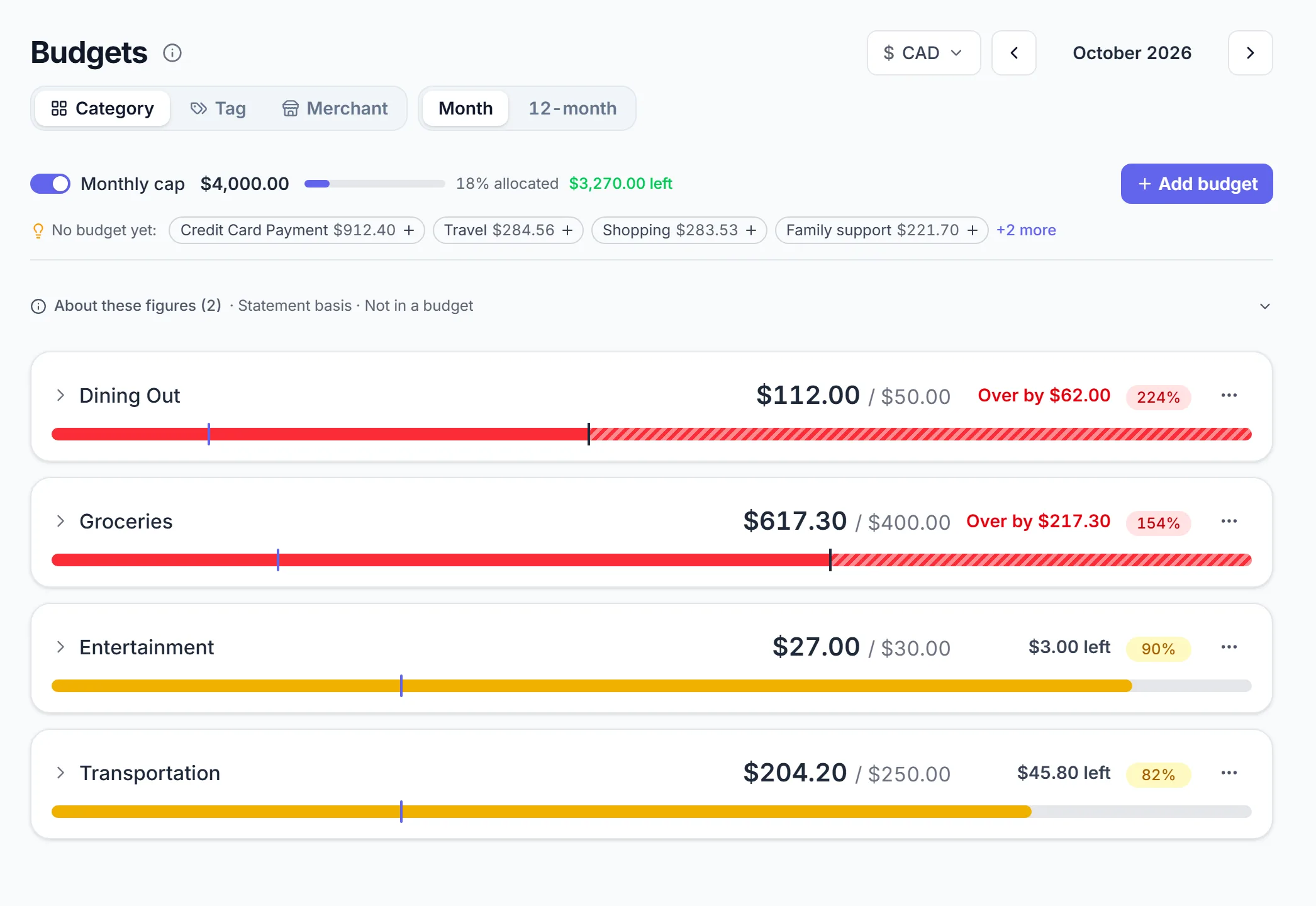
A budget is a limit for a category, a tag or a single merchant, and it reads in plain words: "$120 left" or "over by $40".
Make one#
- Open Budgets and choose Add budget (or press n).
- Pick what it covers: Category, Tag or Merchant.
- Set the amount: a fixed figure, or a percent of your monthly cap.
- Choose monthly or yearly, and whether it repeats every period (on by default) or sits in the months you place it.
Read it#
- The bar fills as you spend; the marker is where you should be by today. Budgets at risk sort to the top.
- Tap the spent figure to see the rows behind it.
- Monthly cap, at the top, is one limit across all categories.
- Rollover is your choice per budget: carry what is left into next month, or start fresh.
- Web [ and ] step back and forward a month.
Year view#
Switch the view from Month to 12-month to see every category across the year, one column per month, with spent against limit and a colour for each cell. Repeating budgets fill the grid; one-off budgets show only in the months you placed them, so seasonal spending stays out of the other months. Override one month, or a range, without touching the rest.
Yearly envelopes#
A yearly budget is one pot for the year, spent down as the months pass. Travel, gifts and insurance are measured year to date, so one big month never trips a false alarm.
Tags, merchants and currencies#
- Tag budgets cap a trip, a project or any theme across categories. They get the same 12-month grid. With Books on, a tag budget can have a total plus per-category lines.
- Merchant budgets cap one shop, for when one shop is the whole problem.
- Per-currency budgets track a category you spend in rupees in rupees, instead of flattening it into your home currency.
Sharing bills with a household? Budgets can count only your share of a split. See Household and splits.
Budget alerts live under Notifications.
Goals#
A goal is a target with a pace. Orbiq projects when your current pace gets you there.
- Open Goals and choose New goal (or press n).
- Name it and set the target, the goal's currency, and an optional target date.
- Choose how it fills.
| Goal | Fills from |
|---|---|
| Savings | Money you add by hand. Each contribution is kept. |
| Category | Rows in the categories you pick, so it fills itself. It can repeat monthly, quarterly or yearly. |
| Tag | Rows with a tag. |
Pace#
Orbiq projects your finish date from what went in over recent months, and updates it as rows arrive.
- Ahead of pace – the projected date is before your target.
- Behind pace – it is after; the card shows the gap.
- No target date – it shows when you would finish at today's pace.
Add money on a savings goal records a contribution with its date: cash put aside, or a transfer no statement shows.
A goal that tracks spending in a category works like a budget. If you want a monthly limit with rollover and alerts, make it a budget instead.
Something missing or unclear? [email protected]