Cross-border and currencies
How Orbiq spots money moving between countries, pairs transfer legs, prices each remittance, and reads everything through the Currency Lens.
Cross-border transfers#
Sending money home, funding an account abroad, moving your own money between two countries: Orbiq recognises these as transfers instead of mistaking them for spending.
How detection works#
A short list of checks runs over each row, strongest first:
- Named remittance services. A row involving a service like Wise, Remitly or Western Union is flagged as a likely cross-border transfer.
- Currency mismatch. Money leaving in one currency and arriving in another is a strong signal.
- Pattern checks. Amount, timing and the accounts involved separate a real transfer from a lookalike purchase.
Payment-rail codes such as NEFT, IMPS, UPI or EFT do not count as cross-border on their own. They appear on ordinary domestic payments too, and would misflag everyday spending.
Pairing: no double-counting#
When Orbiq finds both legs of one transfer, the money leaving one account and arriving in another, it pairs them. A paired transfer is neither income nor spending, so moving your own money never inflates either.
Suggested pairs wait in Review under Moves between your accounts, both legs side by side. Confirm to pair them, or dismiss.
A transfer out with no arrival yet (money sent to someone else's account abroad) shows as Money sent abroad: type what was received and Orbiq can price it.
Your call wins#
Web Mark any transfer cross-border or domestic straight from the ledger; your mark beats detection. A transfer to a remittance service gets a one-tap Cross-border? suggestion.
Remittances#
Web The Remittances page adds up what you have sent across borders, and what each transfer cost you. Orbiq compares the rate you actually got with the mid-market rate on that day, so spreads and fees become a number:
| Example | |
|---|---|
| Sent | CA$1,304 |
| Received | ₹80,000 |
| Your rate · mid-market | 61.35 · 62.10 |
| Cost of the transfer | about CA$15.70 |
Not in your sidebar? Turn it on in Settings → Features & navigation. Leaving "Money across borders" unpicked at sign-up hides it.
Currencies and the Currency Lens#
Orbiq handles 15 currencies in the data itself, not only on screen: CAD, USD, INR, GBP, EUR, AUD, NZD, BRL, SGD, HKD, CHF, SEK, NOK, DKK and PLN.
- Home currency. Set it in Settings → Home currency. Totals read in it.
- Each account has its currency. Rows keep their original amount and currency, and the rate on the day they happened.
- Dated rates. A statement in another currency converts at each row's own date, never today's rate. You can override the rate on any one row.
The Currency Lens#
The Currency Lens leads the controls at the top of each page, once you have money in more than one currency. It reads everything three ways:
- Home – every amount in your home currency, at the rate captured when each row was imported.
- Original – each row in the currency it was charged in. Totals across currencies mean nothing here, and the lens says so.
- A currency you pick – everything converted to it, for comparison.
iPhone & Android The lens sits in the ⋯ menu of each screen's header.
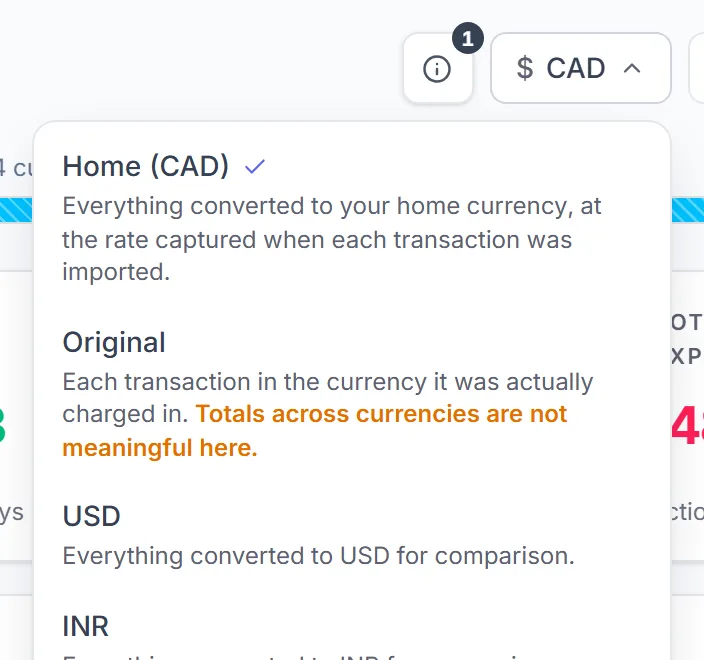
Charts, budgets and goals follow the lens. Budgets can also be set in a currency of their own: see Budgets.
Web Net FX impact shows how exchange-rate moves have helped or hurt the money you have sent across borders. More in Investments.
Something missing or unclear? [email protected]